- Home
- Technical Writing
- MCP Server for EDS da.live
Building an MCP Server for EDS da.live: Scripted AI Flow vs Agent Tools
By Jack Jin · October 5, 2025 · Updated October 4, 2026 · 10 min read · Includes my 9:57 video
There are two ways to let a model edit a da.live page, the newest way to author Edge Delivery Services sites when I built this. In a scripted flow, an Azure Function fetches the page, asks Claude for an edit and saves it. With an MCP server, get and save become two tools, and the model decides when to call them. I built both: same content quality, about twice the time and tokens for the tools, and a lot more flexibility. The code for both is below, with a side-by-side run of both versions that shows where the extra cost comes from.
What changed after
da.live works in HTML
The scripted flow
Why an MCP server
Two tools and an agent

The Claude Desktop demo
Same quality, twice the cost
Building an MCP Server for EDS da.live: From a Scripted AI Flow to Agent Tools
Recorded the night of October 5, 2025. Each part below links to its moment in the video, or watch it on YouTube.
81e4cac, the last commit before I recorded, and 1ffb600 for the scripted version.What changed after October 2025
A week later I pushed the same server much harder: Claude, Gemini and Azure OpenAI on one MCP server, a deploy to Azure Functions, and n8n on top. That's part two.
The repo kept going after that. In November 2025 it picked up tools to preview and publish, create pages and create folders. Over the next months it grew into the Content Factory, agents that generate, migrate and evaluate da.live content, which became my adaptTo() 2026 talk. This article stays with the October 2025 version: two tools, one weekend.
Content is where AI meets EDS, and da.live works in plain HTML
I think content and marketing enablement is ripe for AI. It has migration use cases, personalization use cases, and a lot more, if you can figure out how to get AI to work with content. AEM is a content management system, and Edge Delivery Services is no different.
As I covered in an earlier video, EDS comes in three flavors, and each one needs a completely different way of thinking about AI work:
This one is about da.live, which was Adobe's newest EDS flavor when I built this. Unlike Universal Editor, where you deal with how AEM thinks about content, here you're literally dealing with HTML. Both the get call and the save call carry HTML, and HTML is much cleaner to hand to a model than a tree of nodes.
Watch this part 0:00 Content is where AI meets EDS 0:31 Three EDS flavors, and da.live works in HTML
The first version, a scripted flow with one model call
I started with two Azure Functions. GetContent just fetches a page. No AI, just a call: you pass the bearer token you get from admin.da.live, and the source API hands back the page as HTML. Saving is a POST to the same path, with the HTML sent as form data in a field called data.
functions/src/modules/DaliveClient.js, lines 15 to 23 and 60 to 77
export async function getContent(path, bearerToken) {
  try {
    const response = await axios.get(`${DALIVE_API_URL}${path}`, {
      headers: {
        'Authorization': `Bearer ${bearerToken}`
      },
      timeout: 5000,
      responseType: 'text' // Get raw HTML text, not JSON
    });
  // … retry and error handling trimmed
      // Create multipart form data with HTML as a file
      const formData = new FormData();
      formData.append('data', Buffer.from(html), {
        filename: 'content.html',
        contentType: 'text/html'
      });

      const response = await axios.post(
        `${DALIVE_API_URL}${path}`,
        formData,
        {
          headers: {
            'Authorization': `Bearer ${bearerToken}`,
            ...formData.getHeaders()
          },
          timeout: 5000
        }
      );
For the token, the repo's .env.example has the steps: open da.live, open the browser's DevTools, go to the Network tab, and copy the Authorization header value from a request.
EditContent is what I call the good old classical flow. Get the content, run it through whatever AI scaffolding you have, save it back. The scaffolding here is a prompt plus one call to Claude.
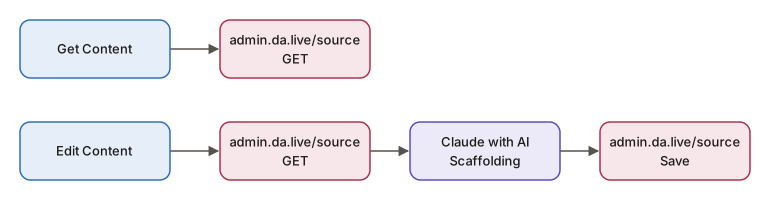
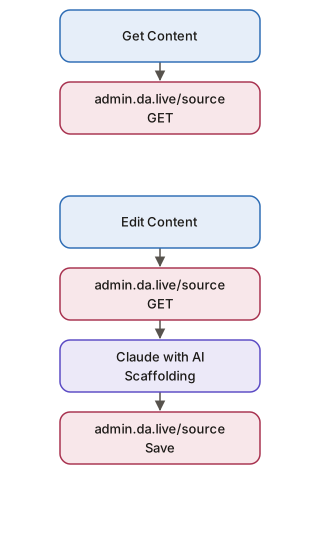
- Function
- Adobe API
- LLM
functions/src/functions/EditContentFunction.js, the scripted version
      // PHASE 1: Fetch HTML content from da.live
      const daliveFetchStart = Date.now();
      let pageContent;
      try {
        pageContent = await getContent(path, bearerToken);
  // … timing and error handling trimmed
      // PHASE 2: Build LLM prompt with HTML content
      const llmPrompt = buildPrompt(command, pageContent.html, path);

      // PHASE 3: Call LLM API
      const llmCallStart = Date.now();
      let llmResponse;
      try {
        llmResponse = await generateEdit(llmPrompt);
  // … timing and error handling trimmed
      // PHASE 4: Update content in da.live with edited HTML
      const daliveUpdateStart = Date.now();
      try {
        await updateContent(path, llmResponse.editedHtml, bearerToken);
Keep one number in mind. This flow took about 15 seconds end to end, and that's with an expensive model that spends a bunch of reasoning tokens. A faster model would probably do it in 5 seconds, if you don't care about quality.
Watch this part 1:21 The scripted flow 2:45 The da.live source API 3:33 15 seconds end to end
Why I turned it into an MCP server
A scripted flow like this is a very old pattern. MCP, the Model Context Protocol, is a standard way to hand tools to a model. A server lists what it can do, and any client that speaks MCP (Claude Desktop, n8n, an agent you wrote) lets the model call those tools.
There were three reasons for the pivot:
- It's more universally plug and play. Agent platforms like n8n work with tools, and if my content operations are tools, any of them can use them.
- Content operations as tools have real uses: content migration, personalization, and more.
- I think this is where the world is going, even with the bottlenecks and drawbacks I'm about to get to.
Watch this part 4:00 Three reasons to make it an MCP server
Two MCP tools, and an agent that decides when to call them
The MCP server does two things: it gets content and it saves content. Everything else moves into a box I call the agent, because that's how n8n and a lot of folks name it. There are so many ways to draw this diagram, and I'm not a fan of drawing it this way, but this is where the board ended up:
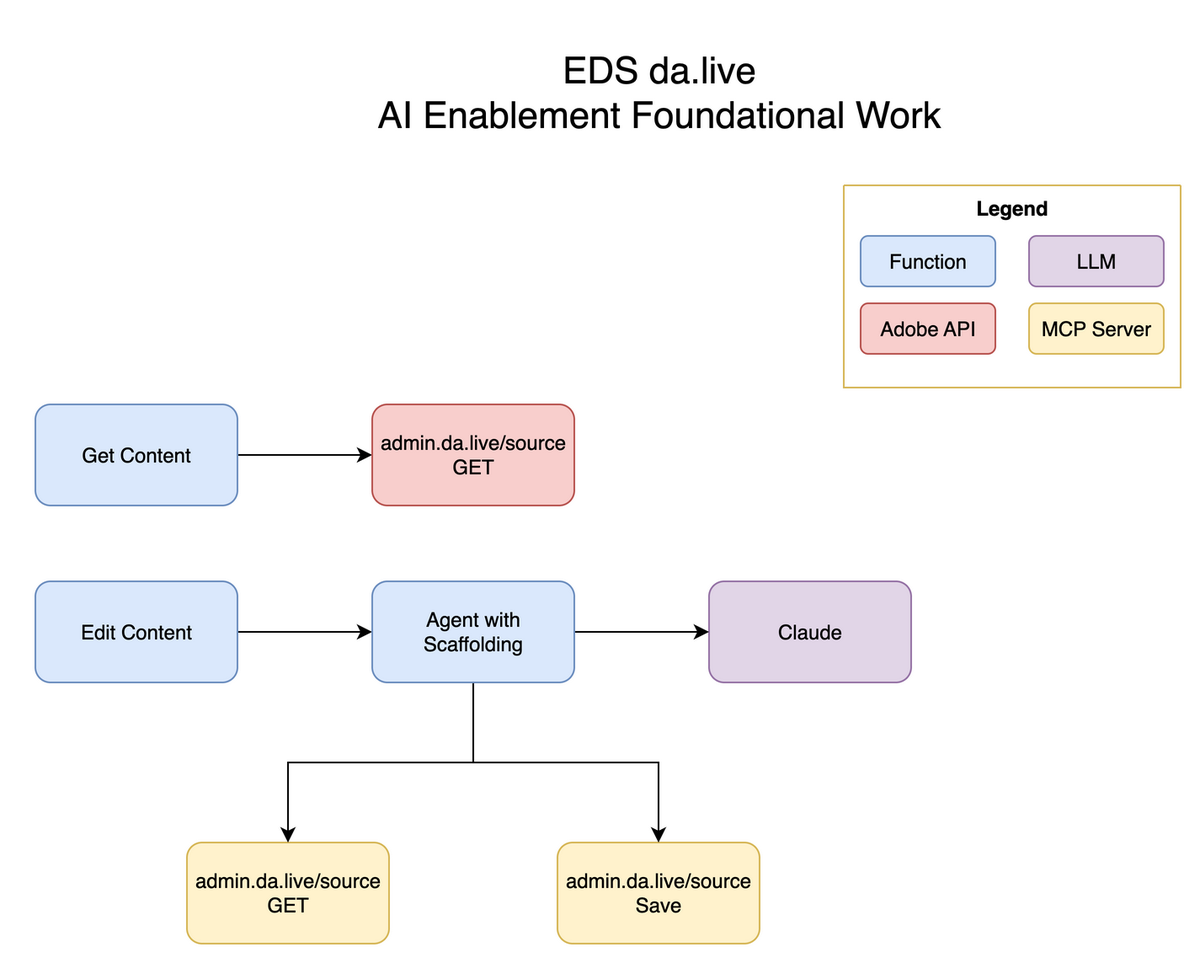
The board at the end of the video. The two calls the code used to make are now MCP tools, and the agent with its scaffolding decides when to use them.
The scaffolding moved too. It used to be the order of the calls in my code. Now it lives in how the agent prompts the model. The prompt in edit-content/v1.0.0.json says FIRST: Call get_dalive_content and LAST: Call save_dalive_content, and the code runs a loop: call the model, and if it asks for a tool, run the tool, add the result to the conversation and call the model again.
functions/src/modules/LlmClient.js, the tool loop
      while (iterationCount < MAX_TOOL_ITERATIONS) {
        iterationCount++;
  // … logging and bookkeeping trimmed
        const response = await client.messages.create(requestParams);
  // … logging and bookkeeping trimmed
        // Check if response contains tool use
        const toolUseBlock = response.content.find(block => block.type === 'tool_use');

        if (toolUseBlock && mcpSession) {
  // … logging and bookkeeping trimmed
            toolResult = await callMcpTool(mcpSession, toolName, toolInput);
  // … logging and bookkeeping trimmed
          // Add tool result to conversation
          messages.push({
            role: 'assistant',
            content: response.content
          });

          messages.push({
            role: 'user',
            content: [
              {
                type: 'tool_result',
                tool_use_id: toolUseId,
                content: JSON.stringify(toolResult)
              }
            ]
          });

          // Continue conversation loop
          continue;
  // … logging and bookkeeping trimmed
        // No tool use - this is the final response
        const textBlock = response.content.find(block => block.type === 'text');
So what did it do? First, in terms of content quality, there was zero difference. Second, it took twice as long and used twice as many tokens: my 15 seconds became 30 or more. Before, I had a fairly scripted AI workflow, where the agentic level is maybe 2 out of 10. Now the agent decides when to get and save content. Slower, but much more scalable.
That loop is where the extra time and tokens come from. Below is a simplified model of both versions of the same edit, built from the two commits. Pick a version, and for the tool loop, a scenario. The log lists every call to the model in order, and the counters show the cost: how many times the model was called, and how many times the whole page went back to it.
The same edit, two versions
Both versions are in the log. The counts are for the tool loop following the order its prompt asks for.
Which version runs
What the model does
- Scripted flow: the code decides
- step 1 Code fetches the page HTML from admin.da.live.
- step 2 Code builds the prompt with the HTML inside it.
- call 1 Code calls the model once. It returns the edited HTML.
- step 3 Code saves the edited HTML to admin.da.live.
- Tool loop: the model decides
- call 1 Sends the prompt. The model asks for get_dalive_content.
- call 2 Sends the conversation so far, page HTML included. The model asks for save_dalive_content.
- call 3 Sends it all again, page HTML included. The model answers with text, so the loop ends.
Same edit. The scripted flow calls the model once. The tool loop calls it three times, and the page goes along on the last two.
- step 1 Code fetches the page HTML from admin.da.live.
- step 2 Code builds the prompt with the HTML inside it.
- call 1 Code calls the model once, page HTML included. It returns the edited HTML. No tools are offered.
- step 3 Code saves the edited HTML to admin.da.live.
- model calls
1 - page sent to the model
1 time - tool calls
0 - page saved
yes
Same order every time: get, one model call, save. The code decides, so the order can’t go wrong. In my test this took about 15 seconds end to end.
ok
- call 1 Sends the prompt. The model asks for get_dalive_content.
- tool Fetches the page HTML from admin.da.live and adds it to the conversation.
- call 2 Sends the whole conversation so far, page HTML included. The model asks for save_dalive_content.
- tool Saves the HTML the model wrote to admin.da.live.
- call 3 Sends the whole conversation so far, page HTML included. The model answers with text, so the loop ends.
- model calls
3 - page sent to the model
2 times - tool calls
2 - page saved
yes
3 model calls where the scripted flow makes one, and the page goes to the model 2 times instead of once. That is where the extra time and tokens come from.
ok
- call 1 Sends the prompt. The model asks for get_dalive_content.
- tool Fetches the page HTML from admin.da.live and adds it to the conversation.
- call 2 Sends the whole conversation so far, page HTML included. The model asks for get_dalive_content.
- tool Fetches the page HTML from admin.da.live and adds it to the conversation.
- call 3 Sends the whole conversation so far, page HTML included. The model asks for save_dalive_content.
- tool Saves the HTML the model wrote to admin.da.live.
- call 4 Sends the whole conversation so far, page HTML included. The model answers with text, so the loop ends.
- model calls
4 - page sent to the model
3 times - tool calls
3 - page saved
yes
Still the right result, with one more model call and one more copy of the page in every call after it. Every time I ran it, it did different things.
ok
- call 1 Sends the prompt. The model asks for save_dalive_content.
- tool Saves the HTML the model wrote to admin.da.live.
- call 2 Sends the whole conversation so far. The model answers with text, so the loop ends.
- model calls
2 - page sent to the model
0 times - tool calls
1 - page saved
yes, unread
Saved, but the model never read the page, so it wrote HTML blind. The prompt says to get the page first. Nothing in the code enforces it. The scripted flow cannot do this.
warn
Tracing the loop shows two more things. Every turn re-sends the whole conversation, so once the page is fetched, its HTML goes back to the model on every call after that. And nothing in the loop checks that a save happened, or that a get came first. The scripted flow guarantees both in code. The tool loop leaves them to the prompt.
Watch this part 4:55 Two tools and an agent that decides 6:16 Same quality, twice the time and tokens
The demo in Claude Desktop, reading the page before editing it
For the demo I drove the tools by hand from Claude Desktop, doing what an agent would normally do. Claude Desktop talks to MCP servers over stdio, and my server speaks HTTP, so a small bridge script in the repo reads JSON-RPC from stdin, forwards it to the function with the bearer token, and writes the answers back. The config is a few lines:
README.md, Claude Desktop setup
   {
     "mcpServers": {
       "azure-da-mcp": {
         "command": "node",
         "args": ["/absolute/path/to/azure-da-mcp/functions/mcp-stdio-bridge.js"],
         "env": {
           "MCP_SERVER_URL": "http://localhost:7071/api/mcp",
           "DALIVE_BEARER_TOKEN": "your-dalive-bearer-token-here"
         }
       }
     }
   }
The page is a normal da.live page from my postal demo site. I pasted its editor URL into the chat. The tool accepts that, the admin.da.live URL or an aem.page URL, and normalizes it to /source/org/site/path.
Then I used what I call two-shot prompting. First: "Can you please get content from this page and let me know what you think." That fetches the content and gets it into context, the front of the model's memory. I can check that it read the page, because it tells me what it thinks. Then the real ask: "Looking at the first cards, can we have Air Hyper Express? Cost will be twice as much as the next highest cost, and write in the rest of the copy."
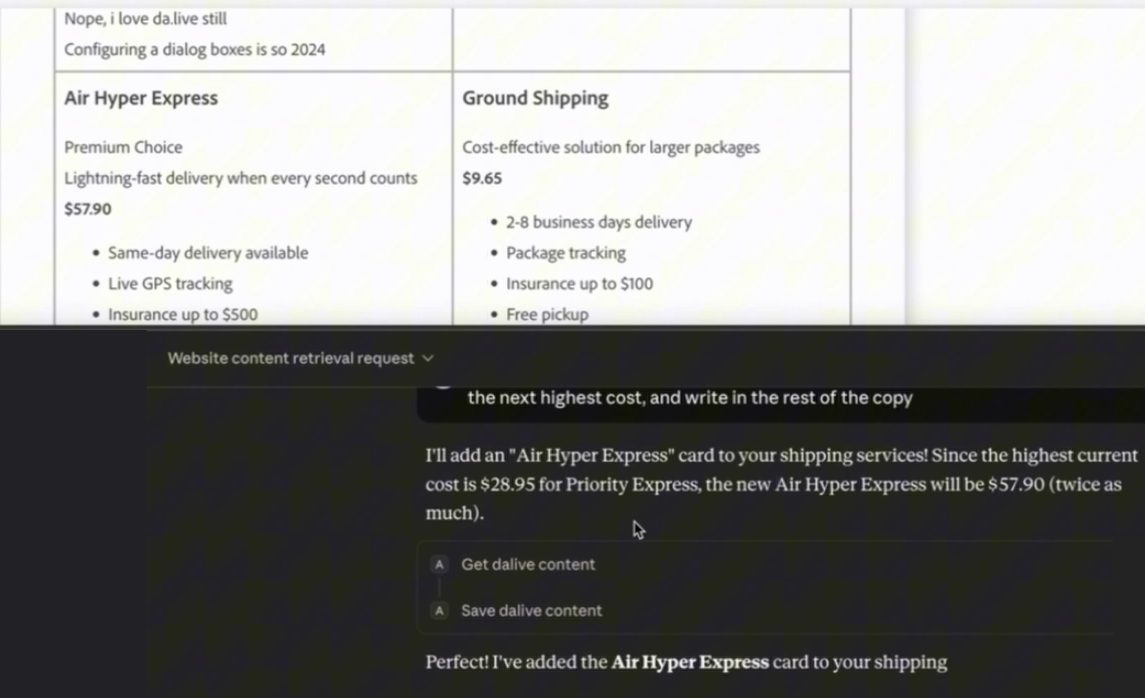
The result in the da.live editor, top, and in Claude Desktop, bottom. It read the highest price on the page and doubled it.
It got the content again, which is fine. Then it saved. The new card showed up in the da.live editor without me even refreshing the screen.
This is also the part to keep in mind: AI is unpredictable. Every time I run this, it does different things. That unpredictability is both a feature and a challenge. The wording of the scaffolding, how the agent prompts the model and how the model chooses its tools, is what drives how effective and how accurate your agent is.
Watch this part 7:13 Demo in Claude Desktop 7:41 Get the page first 8:17 Ask for the new card 9:22 The card in da.live
Same quality, twice the cost, far more flexible
Hopefully this is a good demo of MCP versus not. In the grand scheme of system design, it comes down to your requirements and what your product needs to do. Here's where I landed:
- Content quality was the same either way.
- The tool version costs about twice the time and twice the tokens, because the model makes more calls and the page rides along on each one.
- It's much more flexible. The agent decides when to fetch and when to save, and any MCP client can drive the same two tools.
- Accuracy now depends on how the agent prompts the model. The order of calls used to live in my code.
At this point the server was still a foundation. The bearer token is copied by hand from the browser, and the server only gets and saves; there's no create, preview or publish yet.
Next, I wanted to know whether the same server would work with models other than Claude, and from somewhere other than my laptop. That's part two.
Watch this part 9:32 Wrap-up